Home
Customer operations overview
Understand the core promise behind customer workspaces for delivery, billing, and support.
Keep client support conversations connected to project work in Curoxi using customer workspaces, explicit task references, evidence and clear follow-up.
By Curoxi · Published
A client reports a checkout problem, but the support message does not say which release changed it or which delivery task is relevant. Someone searches old conversations, another person asks finance whether the change was billed, and the customer has to repeat the story. The first improvement is to preserve those references when the request arrives.
Curoxi provides support tickets, comments and attachments within the customer workspace when support is enabled. Tickets currently belong to the customer account, rather than having a dedicated project or task link field. The workflow below connects the conversation operationally through explicit references; it is not an automatic relational link or a promise that selecting a project filters the support queue.
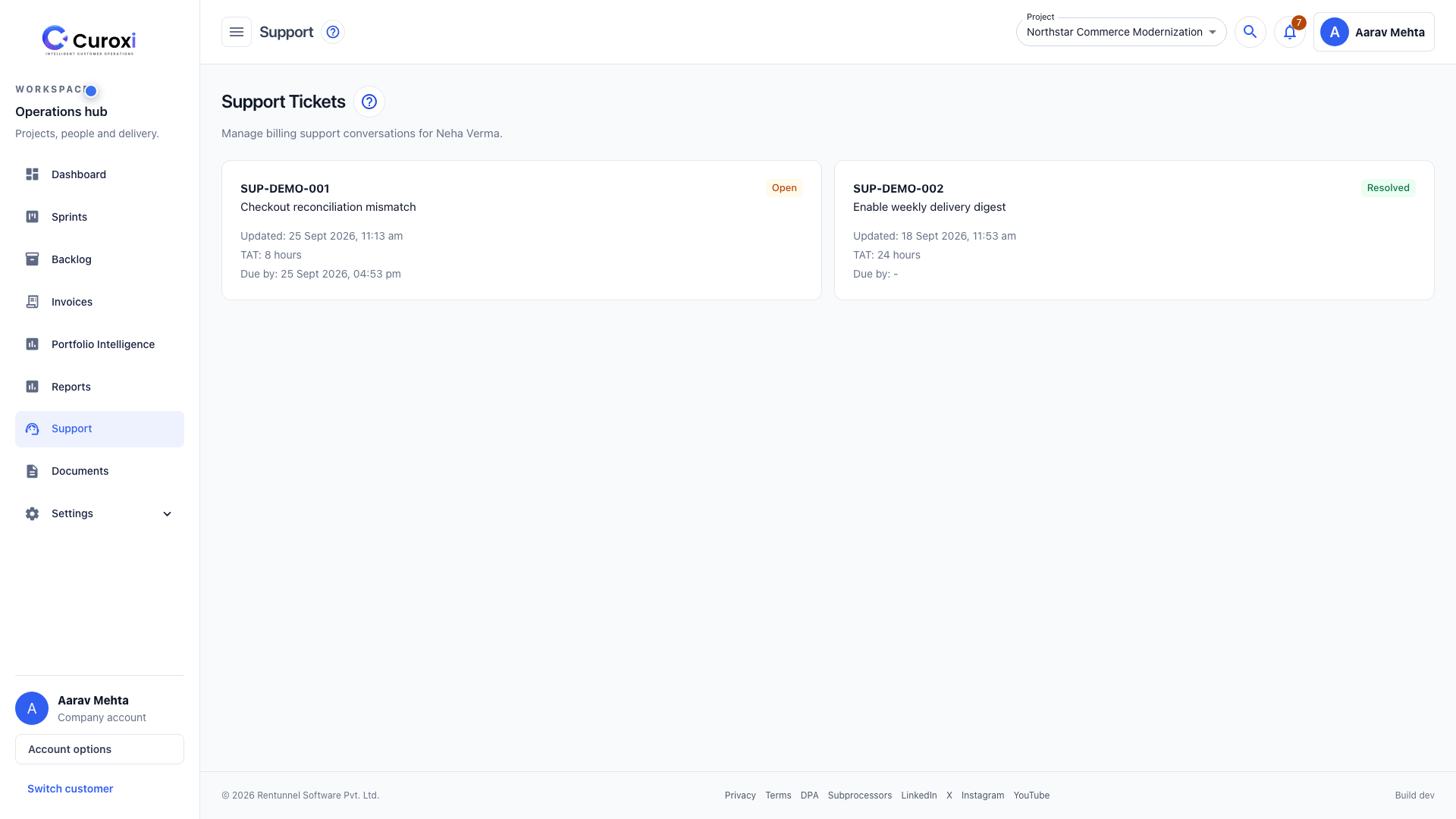
Keep the ticket as the customer-facing account of the issue. If investigation requires engineering work, create or update the relevant task in the correct project using the existing task workflow. Reference the support ticket number in the task discussion, and add the task identifier back to the ticket comment. This is a team-managed cross-reference, not automatic ticket conversion.
For a checkout reconciliation mismatch, the ticket can hold the client’s symptoms while the project task records the owner, due date and delivery stages for the fix. Decide whether the work is part of the original scope, a warranty correction or a separately agreed change before treating it as billable. Merely opening a ticket does not create an invoice.
The support queue shows ticket status and configured turnaround information. Review open conversations regularly, keep the customer informed, and update the status as the issue progresses. A turnaround target is an operating expectation, not proof that the problem has been resolved.
When delivery work is ready, verify the outcome against the original issue and summarize it in the ticket. Include what changed, which reference the client can use to find it, and any remaining action. Resolve the conversation when your team’s resolution criteria are met; closing a delivery task and resolving a support ticket are separate actions.
The same method works for questions about a charge. Include the invoice reference and the related project or task in the ticket description. The responsible team can then check the existing invoice and its payment history while continuing the conversation in the customer workspace.
Do not promise automatic escalation, project-level ticket permissions or automatic synchronization of task and ticket statuses unless those behaviors have been specifically verified in your setup. Customer-level context is useful on its own, provided the team understands its scope. Check plan entitlement and customer access before rolling the process out.
Choose one delivery issue and one invoice question in a demonstration or approved test workspace. Ask a customer user to submit the context, a team member to find the related work, and the delivery lead to write a clear response. Check whether either person had to reconstruct missing information.
Measure time to find the right task, requests for repeated details and unresolved conversations in your own operation. Those observations can tell you whether the process helps; this guide does not claim a measured response-time improvement or a guaranteed reduction in tickets.
Explore the features, check current workspace plans and watch the 19:08 guided demo using local example data.
Browse the core pages that explain how Curoxi works, how pricing is structured, and how to start a workspace.
Home
Understand the core promise behind customer workspaces for delivery, billing, and support.
Features
Review customer workspaces, AI task creation, delivery tracking, support, and billing workflows.
Contact
Route pricing questions, rollout discussions, and workspace setup needs to the right team.
Start
Start with the standard workspace signup flow or jump directly into the Pro trial.